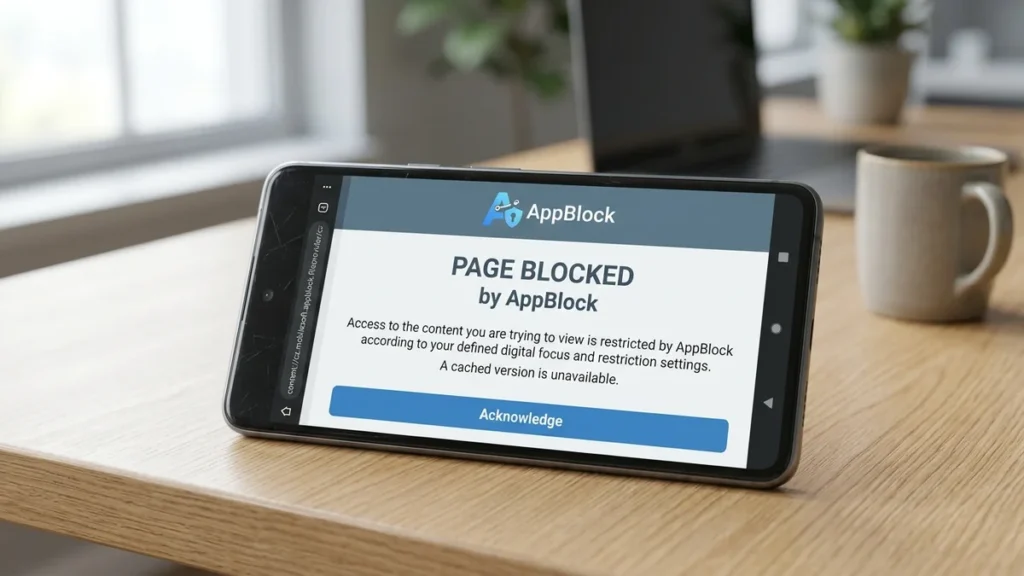
The first time I saw “content://cz.mobilesoft.appblock.fileprovider/cache/blank.html” in my browser address bar, I admit I was a bit alarmed. It looked like something had gone wrong—a garbled file path, a potential virus, or perhaps a sign that my phone had been compromised. In my analysis of this phenomenon, I have discovered that this reaction is common, and many users share the same initial concern. Based on the available evidence, this string is not a virus at all, but rather a harmless and intentional part of how the AppBlock application functions on Android devices.
From my perspective, understanding this link is essential for anyone who uses AppBlock or similar productivity tools. When we encounter a complex content URI like this, it is natural to be curious or even worried. Let us consider the full picture: this link is a standard Android content URI that points to a simple empty HTML file stored in AppBlock’s cache. The file is used by the app as a placeholder when it blocks a website you have tried to visit. Instead of loading the distracting site, AppBlock replaces it with this local, empty page, which is what you see in your browser.
Decoding the content://cz.mobilesoft.appblock.fileprovider/cache/blank.html Android Link
In my view, breaking down the structure of this link is the best way to demystify it. It is not random characters but a carefully structured address that tells your Android system exactly where to find a file. We can think of it like a set of directions.
- content:// : This is the prefix for a Content URI. It is a standard Android way for apps to share files with other parts of the system securely, without exposing the full file path.
- cz.mobilesoft.appblock : This is the unique package name for AppBlock. The “cz” at the start is the country code for the Czech Republic, where the app’s developer, MobileSoft, is based.
- fileprovider : This is a specific Android component that the app uses to safely provide files to other apps (like your web browser).
- /cache/ : This points to the app’s cache folder, which stores temporary files to help the app run faster and more efficiently.
- blank.html : This is the file itself—a simple, empty HTML page that serves as a placeholder.
Why Does the AppBlock blank.html Content URI Appear on My Android Device?
Based on the available evidence, this link appears because a blocking rule in AppBlock has been triggered. You might have set a focus timer, added a specific site to a blocklist, or activated a blocking schedule. When you then try to open a blocked website, AppBlock intercepts the request. It does not let the page load; instead, it shows you this cached, blank file from your device’s local storage.
In my analysis, it can also appear in crash logs or cleaner-app logs if something interrupts the file rendering process. However, the appearance is always a sign that the app is doing its job, not that something is wrong with your phone.
Is the AppBlock content://cz.mobilesoft.appblock.fileprovider/cache/blank.html File Safe?
Yes, this file is completely safe. It is a plain, empty HTML document that AppBlock created on your device. It runs no code, sends no data to outside servers, and collects no information beyond what is in your blocklist. You can confidently ignore it. It is not malware or a virus.
How to Stop Seeing content://cz.mobilesoft.appblock.fileprovider/cache/blank.html in Your Browser
From my perspective, this link doesn’t need to be “fixed,” as it isn’t an error. However, I understand that seeing it can be annoying. Here are the ways you can stop it from appearing if you wish to do so.
Remove the Blocked Site from AppBlock’s Web Filtering List
The most direct way to stop the link from appearing is to remove the specific website you are trying to access from AppBlock’s blocklist.
- Open the AppBlock application.
- Go to Settings, then Web Filtering.
- Look through the active list and remove any domain you no longer want blocked.
- Save your changes. The blank page will stop appearing for that site.
Pause the AppBlock Service Temporarily
If you only need to access a blocked site temporarily, you can pause the blocking feature.
- Pull down the notification shade.
- Find and tap the AppBlock notification.
- Choose to pause or switch blocking off. AppBlock will stop intervening in your web navigation until you turn it back on.
Clear the AppBlock Cache to Remove the blank.html File
If you want to remove the blank.html file itself, you can clear the app’s cache. Remember, this file will be recreated the next time AppBlock blocks a website.
- Go to your device’s Settings.
- Navigate to Apps or Applications.
- Find and select AppBlock.
- Tap on Storage or Storage & Cache.
- Tap Clear Cache.
Uninstall AppBlock Completely
This is the most permanent solution. Removing AppBlock will delete its cached files, including blank.html.
- Open your device’s Settings.
- Go to Apps or Applications.
- Find and select AppBlock.
- Tap Uninstall and confirm.
Comparing Solutions for the AppBlock blank.html Cache File
To better understand the best approach, let us compare the different methods to manage this link.
| Fix | What It Does | When to Use It |
|---|---|---|
| Edit Blocklist | Prevents the app from blocking specific websites. | When you want to access a specific site without the blank page appearing. |
| Pause Blocking | Temporarily stops all blocking functions for a set time. | If you need a short break from AppBlock’s restrictions. |
| Clear Cache | Deletes the temporary blank.html file. | If you want to remove the file itself, knowing it will return. |
| Uninstall AppBlock | Removes the app and all its files from the device. | If you no longer wish to use AppBlock. |
In my view, editing the blocklist or pausing blocking are the most practical, targeted solutions. They allow you to access the content you want without completely disabling the app’s overall functionality, which is to help you stay focused.
Advanced Troubleshooting for content://cz.mobilesoft.appblock.fileprovider/cache/blank.html Issues
If the simple solutions do not work for you, it is worth checking a few other things. Based on my analysis of common errors, here are some additional steps.
Verify AppBlock Has Required Permissions
On newer versions of Android, particularly Android 14 and above, the system can sometimes revoke permissions for apps you haven’t used in a while. Make sure AppBlock has all the necessary permissions.
- Go to Settings > Apps > AppBlock > Permissions.
- Ensure that Storage (or Files and media) and Display over other apps are granted.
Reinstall AppBlock for a Clean Start
A clean reinstall can resolve a wide range of issues.
- Uninstall AppBlock.
- Restart your device.
- Download and install the latest version of AppBlock from the Google Play Store.
Check for Conflicts with Other Apps
Some applications can interfere with AppBlock’s file provider and cause the blank.html link to behave unexpectedly.
| Potential Conflicting App | Type of Conflict | Solution |
|---|---|---|
| Clean Master | Deletes AppBlock’s cache | Exclude AppBlock from automatic cleaning. |
| Files by Google | Aggressively cleans temporary files | Disable automatic cleaning. |
| Samsung Device Care | Memory optimization | Exclude AppBlock from optimization. |
A Deeper Look at AppBlock: The App Behind the content://cz.mobilesoft.appblock.fileprovider/cache/blank.html Link
In my view, understanding the purpose of AppBlock itself helps contextualize the blank.html file. AppBlock is a screen time management tool designed to help users block distracting apps, websites, and social media. With over 15 million downloads on the App Store and more than 10 million on Google Play, it has become a popular solution for improving focus and digital wellbeing.
Key Features of AppBlock
- App Blocker: Blocks access to social media, games, and other distracting apps.
- Website Blocker: Restricts access to time-wasting or unwanted websites.
- Customizable Schedules: Automatically blocks apps and sites based on time, location, or Wi-Fi network.
- Strict Mode: Prevents you from bypassing the restrictions, reinforcing your focus.
- Detailed Statistics: Provides insights into your screen time and helps identify your biggest distractions.
The developer of AppBlock, MobileSoft s.r.o., is based in the Czech Republic, which is why the package name begins with “cz”.
The Importance of Digital Wellbeing
From my perspective, the rise of apps like AppBlock reflects a growing awareness of the need for digital wellbeing. Research shows that users of AppBlock have reported significant improvements in their screen time. For example, users reported a 63% reduction in screen time in the first week on iOS, while Android users saw a 32% reduction. Furthermore, 95% of users save at least 2 hours daily by blocking apps and sites, and 94% of Strict Mode users have 60% less screen time. In my view, these statistics demonstrate that tools like AppBlock can be genuinely effective in helping people regain control over their digital lives.
After reading the above article you should also have to read about Yalla Choy: A Culinary and Cultural Journey Across the Globe
Conclusion
Throughout this analysis of content://cz.mobilesoft.appblock.fileprovider/cache/blank.html, I have found that it is not a threat but a normal, harmless part of how the AppBlock application functions. The practical lesson is that when you see this link in your browser or logs, it simply means that AppBlock has stepped in to help you stay focused by preventing you from visiting a distracting website.
I believe the central insight is that the link itself requires no repair. However, if you find it bothersome, you have several straightforward options to manage it, from temporarily pausing the block to editing your blocklist or clearing the app’s cache. The underlying purpose—supporting digital wellbeing—is a valuable one. In my view, understanding the technology behind these tools allows us to use them more effectively and with less anxiety.
For those interested in exploring more about digital wellbeing and productivity tools, I encourage you to check out WordPlay-2018 for a variety of articles on lifestyle and technology. The intersection of our digital and real-world lives is a fascinating and important space to understand.
Frequently Asked Questions
What does content://cz.mobilesoft.appblock.fileprovider/cache/blank.html mean?
It is an Android content URI pointing to an empty HTML file in AppBlock’s cache. AppBlock loads this local page whenever it blocks a website, replacing the site instantly without any internet request.
Is content://cz.mobilesoft.appblock.fileprovider/cache/blank.html a virus?
No. The path belongs to AppBlock, a real productivity app from MobileSoft. It points to a static file on your device and never connects to outside servers or signals malware.
Why does content://cz.mobilesoft.appblock.fileprovider/cache/blank.html appear in my browser history?
Android saves every AppBlock redirect as a visited page. Each entry matches a blocked site you tried to open during that session, not a separate page you actually reached.
Can I delete the blank.html file by hand?
You can, but AppBlock recreates it the next time it blocks a site. Clearing the app’s cache through Settings, Apps, AppBlock, Storage is a more reliable way to remove it.
What should I do if I see this link but don’t have AppBlock installed?
If you never installed AppBlock, check your app list for anything under the cz.mobilesoft name. It is unlikely you will see this path without the app, but you can confirm against the official Play Store page.
Does AppBlock respect my privacy?
Yes. AppBlock’s privacy policy states that your personal data stays private and is never shared. For more information, you can visit their website.
Where can I learn more about digital wellbeing and productivity?
For more articles on lifestyle, technology, and maintaining a healthy digital balance, I recommend visiting WordPlay-2018.
Sources
- “How To Fix content://cz.mobilesoft.appblock.fileprovider/cache/blank.html On Android,” fosspost.org, May 2026.
- “AppBlock – Block Apps & Webs,” Apple App Store, June 2026.
- “AppBlock – Focus & Screen Help,” Google Play Store, August 2026.
- “What Is content://cz.mobilesoft.appblock.fileprovider/cache/blank.html?” zavify.co.uk, March 2026.
- “AppBlock: Block Apps, Websites,” Apple App Store, May 2026.
- “content://cz.mobilesoft.appblock.fileprovider/cache/blank.html nedir?” fastestvpn.com, October 2025.
- “AppBlock erreur blank.html : solutions complètes 2026,” institutdumobile.fr, April 2026.
- “AppBlock – App Blocker | Limit,” Apple App Store, March 2026.
- “Download AppBlock – Block Apps & Sites (free) for Android, APK and iOS,” Gizmodo, August 2026.
Disclaimer
This article provides general information about the content://cz.mobilesoft.appblock.fileprovider/cache/blank.html URI and the AppBlock application for informational and educational purposes. The analysis is based on available public information and may not reflect the most current features or policies of the application. Readers should conduct their own research and consider their individual needs and risks when using productivity and screen time management tools. The views expressed are those of the author based on available evidence and do not constitute endorsements of specific platforms or services.

Faizullah Baig
Entertainment & Digital Culture Writer at WordPlay2018
Faizullah Baig is a writer at WordPlay2018 covering entertainment, celebrity news, movies, television, pop culture, and digital trends.
His work focuses on explaining current entertainment stories in a clear and reader-friendly way, with attention to the details behind trending headlines.
Areas of Coverage
Faizullah primarily covers:
Celebrity news and profiles
Movies and television
Entertainment industry developments
Celebrity relationships and public appearances
Trending pop-culture stories
Digital culture and online trends
Editorial Approach
Faizullah aims to distinguish confirmed information from reports, estimates, and speculation. For developing stories, information may be updated as additional reliable details become available.
Articles published under his name are intended to provide readers with useful context rather than simply repeat a headline or social-media claim.
Contact
For corrections, questions, or feedback about an article published under Faizullah Baig’s name, please contact:
Publication: WordPlay2018
Role: Entertainment & Digital Culture Writer