If you regularly save TikTok videos, you may have come across TK2DL, a web-based TikTok video downloader designed to let users save TikTok content as MP4 files.
The attraction is simple. Instead of installing another application, users can use a browser-based downloader to process a TikTok video link and save the resulting file to a device. TK2DL describes its service as a way to download TikTok videos to phones or computers, including downloads without the TikTok watermark.
However, there is more to a TikTok downloader than clicking a download button.
Before using TK2DL, I would look at what the service actually offers, how the downloading process works, what information you should avoid providing, and whether downloading a particular video is appropriate from a copyright perspective.
This guide covers those questions without treating every third-party downloader as automatically safe or unsafe.
What Is TK2DL?
TK2DL is a browser-based TikTok video downloader.
Its main purpose is to process a TikTok video URL and provide a downloadable video file. According to TK2DL’s own terms, the service can be used to download MP4 videos to a phone or computer and is intended for personal use.
The service does not present itself as an official TikTok product. That distinction is important because TK2DL and TikTok are separate services.
TikTok operates its own platform, apps, download functionality and content policies. TK2DL is a third-party tool that interacts with publicly accessible TikTok content.
| TK2DL detail | What it means |
|---|---|
| Service type | Web-based TikTok downloader |
| Main purpose | Save TikTok videos |
| File format | MP4 according to its terms |
| Device use | Phone and computer |
| Installation | Browser-based service |
| Account requirement | The service is designed around video URLs rather than requiring a TikTok login |
| Watermark claim | TK2DL advertises watermark-free downloads |
| Main caution | Copyright, privacy and third-party-site risks |
The important takeaway is that TK2DL is a downloader tool, not TikTok itself.
How Does TK2DL Work?
The basic concept is straightforward.
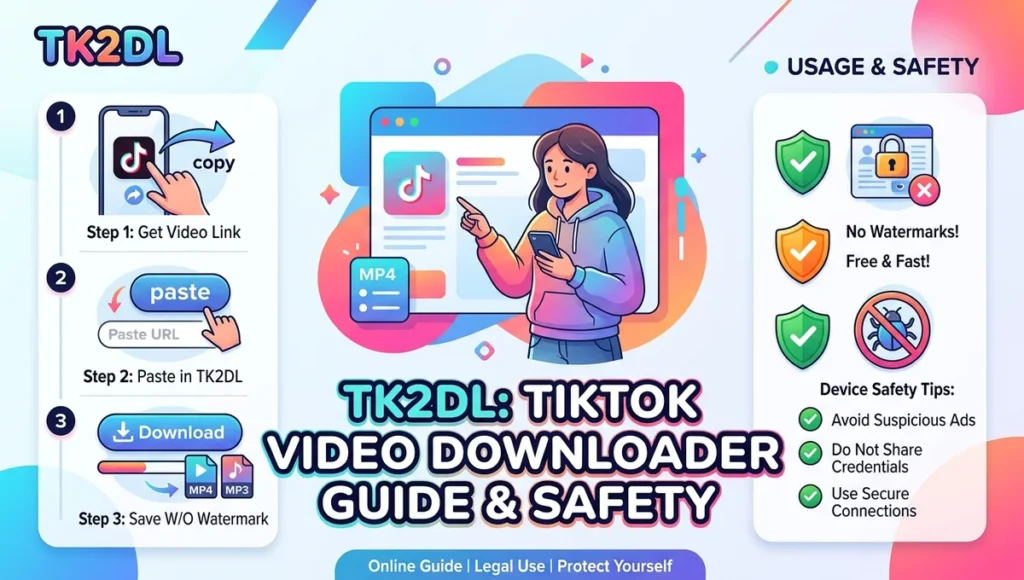
You find a TikTok video, copy its share link and provide that URL to the downloader. The service then processes the link and presents a download option when the video can be retrieved.
The exact interface can change over time, so I would focus on the basic workflow rather than relying on a particular button name.
Basic TK2DL Download Process
- Open TikTok.
- Find the video you want to save.
- Use TikTok’s sharing option to copy the video link.
- Open TK2DL in your browser.
- Paste the TikTok URL into the downloader field.
- Start the conversion or download process.
- Choose the available download option.
- Check the downloaded file before sharing or publishing it elsewhere.
TikTok itself also provides native options for saving content to a device where downloads are available. Its support documentation specifically includes a “Manage video downloads” section for saving TikTok videos.
Therefore, I would first check whether TikTok’s own download option meets your needs before turning to a third-party downloader.
Can TK2DL Download TikTok Videos Without a Watermark?
This is one of the main reasons people search for TK2DL.
TK2DL advertises the ability to download TikTok videos without the watermark.
A watermark-free file can be useful for personal offline viewing or for working with your own original videos. However, removing a watermark does not remove copyright ownership.
That distinction matters.
If someone else created the video, downloading a clean copy does not automatically give you permission to repost it, sell it, use it in advertising or upload it to another platform.
In other words:
No watermark does not mean no copyright.
TikTok’s intellectual property policy states that copyright protects original works such as videos and music, and unauthorized use may violate copyright rules unless a valid exception or authorization applies.
Is TK2DL Free?
TK2DL presents its downloading service as free. Its own website describes the service as a free TikTok downloader.
However, users should distinguish between the basic downloader and everything they may encounter around it.
Third-party download sites can contain advertisements, redirects or links to other websites. TK2DL’s terms themselves acknowledge that third-party sites may be linked from its websites and that TK2DL does not control those external sites.
So I would treat any unexpected:
- payment request
- browser extension
- APK download
- account login request
- notification permission
- software installation
- suspicious redirect
as a reason to stop and reconsider.
Is TK2DL Safe to Use?
There is no responsible way to describe a third-party downloader as completely risk-free.
The safest approach is to minimize what you give the service.
For example, a downloader should not require your TikTok password just to process a public video URL. You should also be cautious if a website suddenly asks you to install unrelated software.
TikTok itself warns users about fraudulent apps and external APK links and recommends obtaining TikTok apps through official distribution channels.
That warning is particularly relevant when using websites that advertise TikTok-related tools.
Simple TK2DL Safety Checklist
Before downloading anything, I would check:
- Is the URL correct?
- Does the site unexpectedly ask for a TikTok password?
- Does it request unnecessary permissions?
- Is an APK or browser extension being pushed?
- Does a download button open another website?
- Does the file extension look suspicious?
- Is the browser showing a security warning?
- Are you being pressured to install software?
A normal video download should not require you to hand over your TikTok account credentials.
Does TK2DL Need Your TikTok Login?
For the basic URL-based downloading concept, you should not need to provide your TikTok password.
That is one of the most important safety principles when using third-party services.
If a website claiming to download a TikTok video asks you to enter your TikTok username and password, I would not continue simply because it promises a better download.
Your TikTok account contains personal information and access to your content. Giving credentials to an unrelated downloader creates a completely different security risk from simply processing a public video URL.
The same principle applies to Google, Apple, Facebook and other account credentials.
A downloader should not need your main account password just to download a video.
TK2DL on Android
Android users can access browser-based services without necessarily installing a separate downloader application.
That can be convenient because you avoid giving an unknown APK permission to run on your phone.
A simple workflow is:
- Open TikTok.
- Copy the video link.
- Open your mobile browser.
- Visit TK2DL.
- Paste the link.
- Process the video.
- Download the resulting file.
- Check your Downloads or Files folder.
I would generally prefer this browser-based approach over installing an unknown APK from an unrelated website.
If a website insists that you must install an APK to continue, stop and investigate the file before installing it.
TK2DL on iPhone
The basic browser workflow can also be used on an iPhone when the service and browser support the requested download.
After downloading, the file may appear in the Files app rather than directly inside Photos.
The exact behavior can vary depending on the browser and iOS version.
If the file does not appear where expected, check:
Files → Downloads
Then move or save the video to the appropriate location if the file format and permissions allow it.
Again, there is no reason to give an unfamiliar downloader your Apple ID credentials simply to save a TikTok video.
TK2DL on PC
Using TK2DL on a desktop computer can be convenient when you want to save several videos for personal reference or offline viewing.
The general process remains the same:
TikTok → Copy link → TK2DL → Paste link → Download
The downloaded MP4 file can then be found in the browser’s Downloads folder unless you have selected another destination.
A computer also makes it easier to inspect a downloaded file before opening it.
If the website provides a normal video file, the extension should make sense. Be especially careful with unexpected executable files such as .exe or installation packages when you were expecting an MP4 video.
TK2DL vs TikTok’s Built-In Download
This is an important comparison because third-party tools are not always necessary.
TikTok provides its own download functionality for eligible content. Its support documentation explains that users can save TikTok videos and photos to their devices where the feature is available.
| Option | Main advantage | Main consideration |
|---|---|---|
| TikTok built-in download | Official platform feature | Availability depends on content/settings |
| TK2DL | Third-party downloader and watermark-free download claim | Requires trust in an external service |
| Screen recording | No downloader website required | Quality and interface elements can vary |
| Creator-provided file | Best when you need authorized original content | Depends on creator |
For ordinary personal saving, I would check TikTok’s own download option first.
A third-party downloader becomes more relevant when the native option does not provide the format or result you need.
What If TK2DL Is Not Working?
A downloader can fail for several reasons.
The TikTok URL may have changed, the video may no longer be publicly accessible, the content may have restrictions, or the third-party service itself may temporarily be unavailable.
Try these steps:
Check the URL
Copy the TikTok link again instead of using an old link stored somewhere else.
Try a Public Video
If one video fails, test another publicly accessible video. This can help determine whether the problem is specific to the video or the service.
Refresh the Browser
Temporary browser problems can sometimes interfere with third-party download pages.
Try Another Browser
If the page behaves strangely, test it in another current browser rather than installing an unknown application.
Avoid Suspicious “Fixes”
Do not install random extensions, APK files or executable programs just because a download page says they are required.
Why Does TK2DL Sometimes Show Different Results?
Not every TikTok video is necessarily going to behave the same way.
A downloader depends on the source URL and whatever access the third-party service can obtain at that time.
Videos can also change status.
A creator may delete content, change privacy settings or restrict access. TikTok’s own platform rules and technical systems can also change.
Consequently, a downloader that works today may behave differently later.
This is normal for third-party services that depend on another platform.
Is Downloading TikTok Videos Legal?
There is no universal yes-or-no answer.
The key issue is what you do with the downloaded material and whether you have the necessary rights.
Downloading your own video for backup is very different from downloading somebody else’s copyrighted video and uploading it to your own commercial social account.
TikTok’s current terms state that users must respect intellectual property rights. TikTok’s intellectual property policy also explains that unauthorized use of copyrighted material can create infringement issues, subject to applicable legal exceptions.
TK2DL’s own terms similarly place responsibility on users for the content they access and tell users to respect copyright.
Therefore, before reposting a downloaded TikTok video, ask:
- Did I create this video?
- Do I have permission from the creator?
- Do I have rights to the music?
- Am I using it commercially?
- Does the intended use fall under a legal exception?
- Am I complying with the platform’s rules?
If the answer is unclear, don’t assume that downloading equals permission to republish.
Can You Repost a TK2DL Download?
Technically, having an MP4 file on your device does not determine whether you are allowed to republish it.
That decision depends on ownership, permission, licensing and applicable law.
Even if TK2DL removes the TikTok watermark, the underlying video may still belong to its original creator or another rights holder.
This is where many downloader articles oversimplify the issue.
A clean file is simply a different version of the downloaded media. It is not automatically a license.
What Information Should You Give TK2DL?
For a basic download, the safest approach is to provide only what is necessary for the service to perform its stated function.
A TikTok video URL is fundamentally different from a password.
Never enter sensitive credentials into a third-party downloader merely because the site says doing so will unlock a download.
I would also avoid submitting private personal information unless you have a clear reason and understand the site’s privacy terms.
TK2DL’s terms contain a privacy policy reference and explain that third-party websites linked from its service are outside its control.
That means users should evaluate the actual destination before clicking unfamiliar links.
Common TK2DL Mistakes to Avoid
Several mistakes can make a simple download unnecessarily risky.
Using the Wrong Website
Search results can contain similarly named services, advertisements and unofficial pages.
Always verify the domain before entering any information.
Installing an Unknown APK
A video downloader should not automatically require an APK.
If an APK appears, verify exactly what it is before installing it.
Sharing Copyrighted Videos Without Permission
Downloading and reposting are separate actions.
Permission for one does not automatically cover the other.
Clicking Every Download Button
Some pages may display multiple advertising elements that look similar to download controls.
Take a moment to identify the actual download option.
Giving Away Your Password
A TikTok downloader should not need your TikTok password for a basic public-video download.
Who Should Use TK2DL?
TK2DL may be useful for people who want a browser-based way to save TikTok videos, particularly when they need a downloadable MP4 or are looking for the watermark-free result advertised by the service.
It can make sense for:
- Saving your own TikTok videos
- Keeping personal offline copies
- Downloading content you have permission to use
- Moving your own content between devices
- Reviewing videos offline
However, I would not recommend using any downloader as a shortcut around copyright restrictions.
Who Should Avoid Third-Party Downloaders?
You may want to avoid them if you are uncomfortable with external websites, advertisements or privacy uncertainty.
In that situation, TikTok’s native download functionality may be the simpler choice when it is available.
Likewise, creators working with commercial content should be particularly careful about licensing.
If you need an original video for a campaign, advertisement or professional project, obtaining the file directly from the creator or rights holder is usually a cleaner approach than relying on a third-party downloader.
Final Verdict on TK2DL
TK2DL is a third-party TikTok video downloader built around a simple URL-based downloading concept. Its own terms describe MP4 downloads for phones and computers and advertise watermark-free downloading.
That makes the service relevant for users who want to save TikTok videos outside the TikTok app.
However, the most important part of using TK2DL is not the download button. It is understanding the difference between access, downloading and ownership.
If you are saving your own content or material you have permission to use, the tool can be convenient. If you are downloading someone else’s content, removing a watermark does not remove their copyright.
For safety, avoid entering TikTok credentials, be careful with redirects and unexpected software, and treat unfamiliar APKs or extensions as potential security risks. TikTok itself warns users about fraudulent applications and external APK links.
Most importantly, check whether TikTok’s own download feature already does what you need before using a third-party service.
FAQ
What is TK2DL?
TK2DL is a third-party web-based TikTok video downloader that allows users to process TikTok video links and download videos as MP4 files.
Is TK2DL a TikTok app?
No. TK2DL is a separate third-party service and should not be confused with the official TikTok platform.
Can TK2DL download TikTok videos without a watermark?
TK2DL advertises watermark-free TikTok video downloads as one of its features.
Is TK2DL free?
TK2DL describes its downloader as a free service.
Can I use TK2DL on Android?
The service is designed to work through a web browser, so users can access it from compatible mobile devices without necessarily installing a separate downloader application.
Can I use TK2DL on iPhone?
Yes, the browser-based approach can be used on compatible iPhones. Downloaded files may be stored through the Files app depending on your browser and device settings.
Can I use TK2DL on a computer?
Yes. TK2DL describes its service as supporting downloads to computers as well as phones.
Does TK2DL require my TikTok password?
A basic URL-based downloader should not require your TikTok password. Avoid entering account credentials into an unrelated third-party downloader.
Is downloading a TikTok video legal?
It depends on the content, your rights, permission and intended use. Downloading a file does not automatically give you permission to republish copyrighted material.
Can I repost a video downloaded with TK2DL?
Not automatically. If the video belongs to another creator, you should have appropriate permission or another valid legal basis before republishing it.
Is TK2DL better than TikTok’s built-in download?
It depends on your goal. TikTok’s native download feature is the first option to check, while TK2DL is a third-party alternative with its own advertised features.
Sources / Research Basis
- TK2DL Terms of Service
- TikTok Terms of Service
- TikTok Intellectual Property Policy
- TikTok Help Center — Manage Video Downloads
- TikTok Safety guidance on fraudulent apps and external APKs
Disclaimer: Features, availability and website behavior can change. This article explains TK2DL based on its publicly available service information and current TikTok documentation. Always verify the current website, respect copyright and avoid entering sensitive credentials into third-party services.

Faizullah Baig
Entertainment & Digital Culture Writer at WordPlay2018
Faizullah Baig is a writer at WordPlay2018 covering entertainment, celebrity news, movies, television, pop culture, and digital trends.
His work focuses on explaining current entertainment stories in a clear and reader-friendly way, with attention to the details behind trending headlines.
Areas of Coverage
Faizullah primarily covers:
Celebrity news and profiles
Movies and television
Entertainment industry developments
Celebrity relationships and public appearances
Trending pop-culture stories
Digital culture and online trends
Editorial Approach
Faizullah aims to distinguish confirmed information from reports, estimates, and speculation. For developing stories, information may be updated as additional reliable details become available.
Articles published under his name are intended to provide readers with useful context rather than simply repeat a headline or social-media claim.
Contact
For corrections, questions, or feedback about an article published under Faizullah Baig’s name, please contact:
Publication: WordPlay2018
Role: Entertainment & Digital Culture Writer